Click Add to open a Create New Loto form:
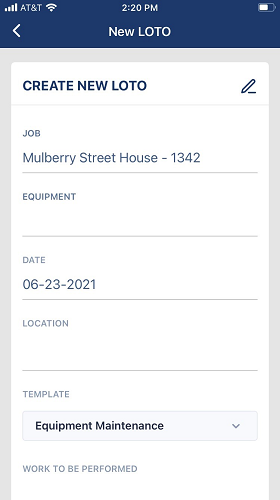
• The JOB field defaults to the job displaying in the Assigned Job pane on the main dashboard.
• The DATE field defaults to the current date.
• The TEMPLATE field defaults to the first template created by the Admin. There is a dropdown for this field to change to different template.
Note: Templates in the dropdown list do not display in alphabetical order.
• In the EQUIPMENT field, type in the equipment name. This is a required field.
• In the LOCATION field, type the location. This is a required field.
• In the WORK TO BE PERFORMED field, enter a description of the work to be performed.
• Click CREATE LOTO.