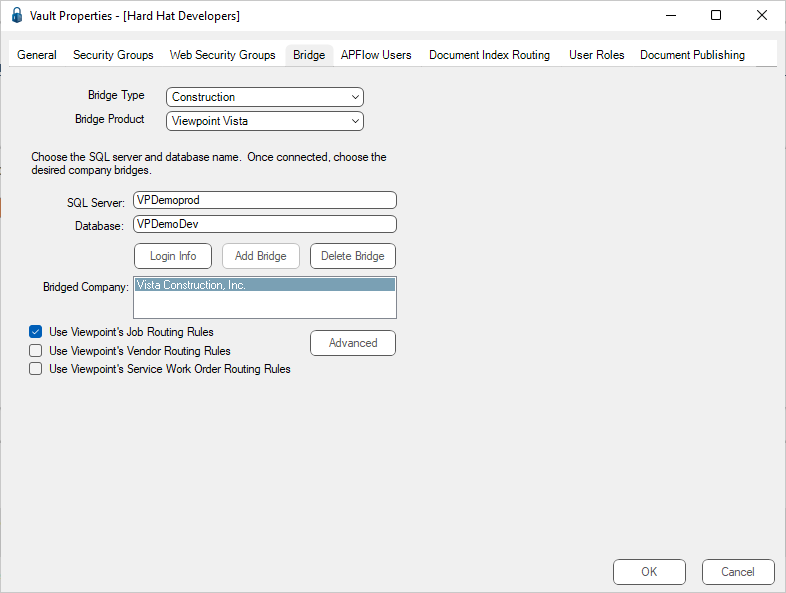
The Bridge tab is used to set up the connection or “bridge” between the pVault® system and the in-house accounting/ERP system.
This "bridge" provides data look-ups for indexing documents and throughout the APFlow™ Invoice Routing and Approval module.
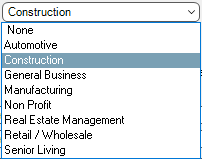
The Bridge Type field dropdown reflects the business categories with which pVault is involved.
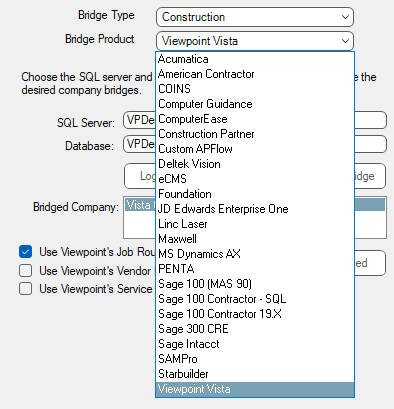
The Bridge Product field dropdown is connected with the bridge type and reflects those accounting systems associated with a specific business category.
For example, If the Bridge Type field is Construction, the dropdown list displays the accounting systems from which to select.
Note: If the Bridge Type field is None, then the Bridge Product field is not active.
Based on the Bridge Type field and Bridge Product field entries, the remaining fields displaying on the Bridge tab change.
Note: Even if the Bridge Type field entry is static and the Bridge Product is changed, the remaining fields displaying on the Bridge tab may change.
See Abila MIP Fund Accounting Bridge Settings to set up a bridge to the Abila MIP Fund Accounting database.
See Acumatica Bridge Settings to set up a bridge to the Acumatica data folder.
See ComputerEase Bridge Settings to set up a bridge to the ComputerEase data folder.
See Custom APFlow™ Bridge Settings to set up a bridge to the Custom APFlow™ data folder.
See Foundation Bridge Settings to set up a bridge to the Foundation database.
See Linc Laser Bridge Settings to set up a bridge to the Linc Laser data folder.
See MatrixCare Bridge Settings to set up a bridge to the MatrixCare data folder.
See MRI Bridge Settings to set up a bridge to the MRI database.
See MS Dynamics GP Bridge Settings to set up a bridge to the MS Dynamics GP database.
See Penta Bridge Settings to set up a bridge to the Penta data folder.
See RFMS Bridge Settings to set up a bridge to the RFMS database.
See Sage 100 Contractor Bridge Settings to set up a bridge to the Sage 100 Contractor database.
See Sage 100 ERP (MAS 90) Bridge Settings to set up a bridge to the Sage 100 ERP (MAS 90/100) data folder.
See Sage 300 CRE Bridge Settings to set up a bridge to the Sage 300 CRE data folder.
See Sage 300 SQL Replicator to set up a bridge to the Sage Replicator data folder.
See Sage Intacct Bridge Settings to set up a bridge to the Sage Intacct database.
See Starbuilder Bridge Settings to set up a bridge to the Starbuilder database.
See Viewpoint Vista Bridge Settings to set up a bridge to the Viewpoint Vista database.
For other database systems not listed, contact the Paperless Environments Support organization.