Associated Entry Icons
Icon |
Column |
Description |
|
Store |
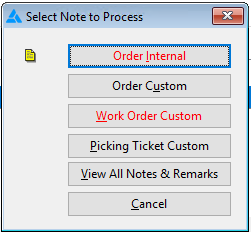
Indicates one or more notes are associated with this entry. Click the icon in the toolbar to access the Select Note to Process dialog similar to the following:
Note: The red font indicates the type of existing note(s). |
|
Store |
Indicates one or more documents are attached to this entry for the line level, the header level or both. |
|
Delivered |
Indicates there is a credit amount in the Balance Due field. |