Company and vendor license tracking can be configured on the Configuration tab in Manage Greenlight.
You can use the top section of the Configuration Settings pane to configure the following:
•Insurance Expiration Threshold: Enter the number of days prior to insurance policy expiration vendors should be notified.
•Insurance Rating Service: Use the dropdown to select which rating service your company uses.
•Job Sort Method: Select the priority order for Job Name and Job Number.
•Use Job Address Type: Select either Mailing Address or Ship To Address as the default address for imported jobs. This is the address that is used when creating a new job via Add Job > Import Jobs.
Note: This functionality only applies to systems bridged to Sage 300 CRE accounting systems.
•Allow Imported Job Data Override: By default, imported job information cannot be edited. Select this check box to give users the ability to update the Job Info tab for imported jobs.
Note: If this option is enabled, jobs no longer update automatically via the Accounting Refresh job in the Polling Service.
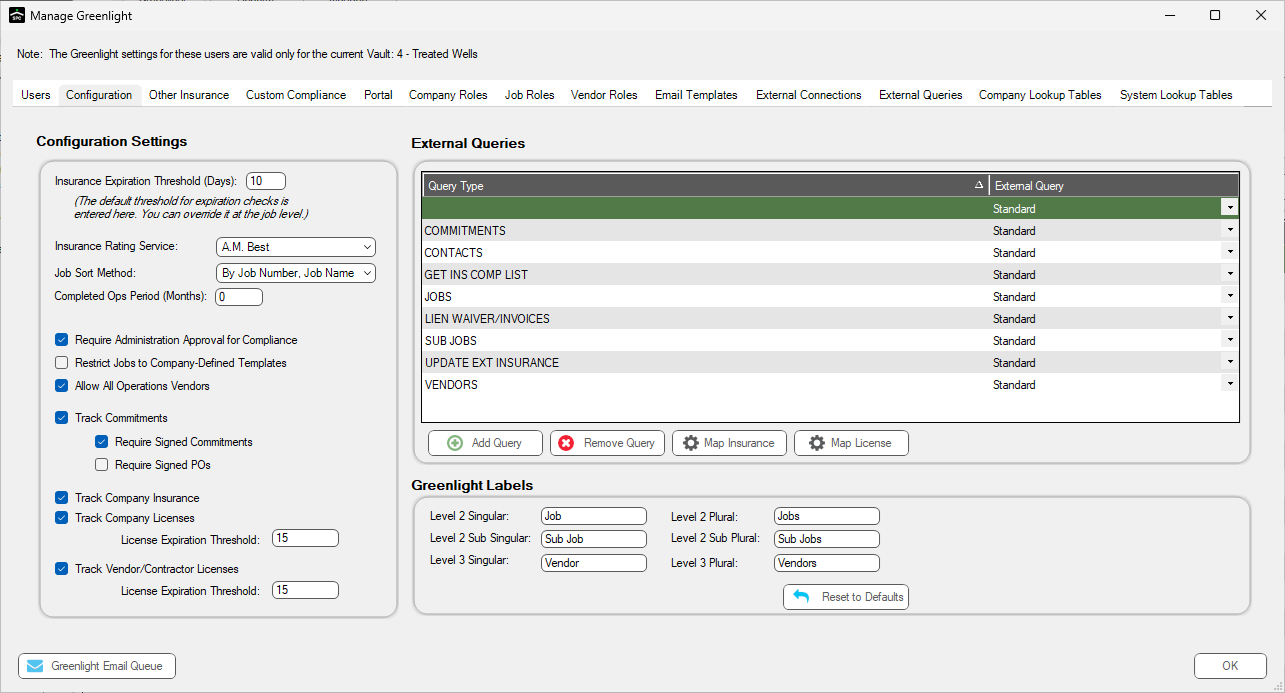
See the sections below for additional Greenlight configuration procedures:
•For details on Administration Approval for Compliance, click here.
•For details on restricting jobs to Company-Defined Templates, click here.
•For details on allowing All Operations vendors, click here.
•For details on tracking commitments, click here.
•For details on required signed commitments, click here.
•For details on requiring signed POs, click here.
•For details on tracking company insurance, click here.
•For details on tracking company licenses, click here.
•For details on tracking vendor or contractor licenses, click here.
•For details on customizing labels, click here.